The evolution of AI agents
Prompt, Context, Tool, MCP, CLI, Skill seem to overlap. A chronological walkthrough of the problem each one solved, checked against the original papers.
- First written
- Category
- AI
- Reading time
- 8 min
- Reads
- —
In this entry
When you start coding with AI, it’s easy to drown in terminology: Prompt, Context, Tool, MCP, CLI, Skill… and their roles seem to overlap. For example, if MCP already lets AI connect to external tools, why is everyone now pushing Skills plus CLIs?
I find the easiest way to make sense of them is to put them back on a timeline and ask the same question each time: when this term appeared, where was AI stuck?
One timeline
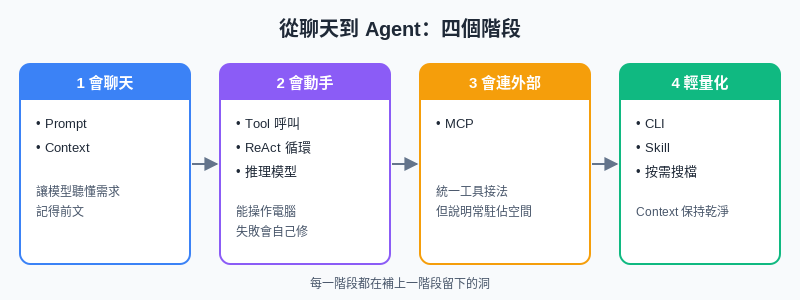
Prompt → Context → Tool / ReAct → reasoning models → MCP → CLI + Skill → on-demand file search| Stage | Key terms | Problem solved |
|---|---|---|
| Chatting | Prompt, Context | Get the model to understand the request and remember earlier turns |
| Acting | Tool, ReAct, reasoning models | Let the model operate a computer and fix its own failures |
| Connecting out | MCP | Standardize how tools are plugged in |
| Slimming down | CLI, Skill, on-demand file search | Keep the limited context clean |
My biggest takeaway from the whole timeline: almost every later step deals with the same thing — Context is never big enough or clean enough.
Chatting: Prompt and Context
After ChatGPT launched at the end of 2022, people first studied how to write prompts: put the role and rules in a system prompt, give a few examples (few-shot), and ask the model to reason step by step (Chain of Thought).
Chain of Thought was the most striking. I went back to the original paper: in 2022, Kojima et al. found that just adding Let’s think step by step raised text-davinci-002’s accuracy on the MultiArith math dataset from 17.7% to 78.7%. “Think before answering” was later built into the models themselves — today’s Thinking feature.
But however good the prompt, what really drives the result is the whole Context: everything sent to the model on each call.
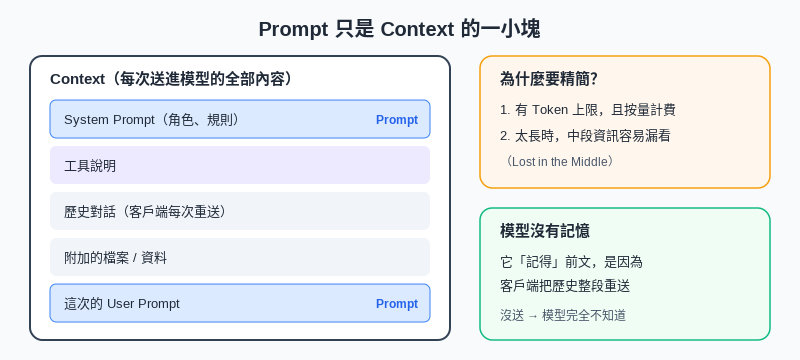
Two ideas matter here:
- The model is stateless: it “remembers” earlier turns only because the client resends the whole history every time.
- The longer the Context, the more gets missed: Liu et al.’s 2023 “Lost in the Middle” found that models do best when key information sits at the beginning or end of a long input, and noticeably worse when it’s in the middle.
Add the fact that Context has a length limit and is billed per token, and the conclusion is simple: include only what this task needs.
Acting: Tools, ReAct, and reasoning models
Tool calling
In June 2023, OpenAI added Function Calling to its API, and other models soon supported something similar. It works as a round trip in an agreed-upon format:
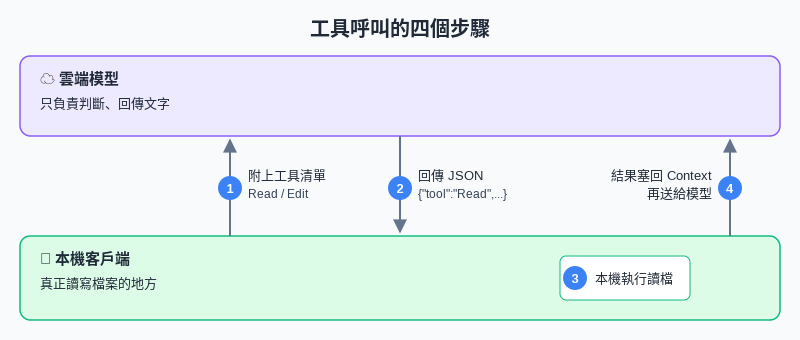
The model returns an instruction like this (a simplified illustration; real APIs use different fields):
{ "tool": "Read", "path": "index.html" }The local client does the actual file reading; the cloud model never touches your computer. I think this is worth remembering: what an agent can reach depends on which tools the client exposes; how well it uses them and whether it finishes the task is up to the model.
The ReAct loop
With single calls only, a failure means a full stop. ReAct (Reason + Act), proposed by Yao et al. in 2022, has the agent run a “think → act → observe → think again” loop, so it can try another route when something fails.
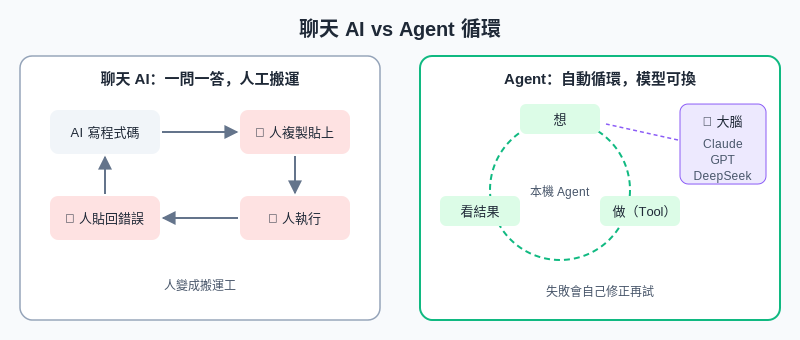
The loop runs locally, and the cloud model is just a swappable “brain.” This is model decoupling.
Reasoning models
Early models were poor planners, which is why fixed-step workflow tools like n8n and Dify were popular in 2023–2024. The 2023 SWE-bench paper shows where things stood: in a setup where the model couldn’t explore on its own and had to produce a patch in one shot from retrieved files, the best performer, Claude 2, resolved only 1.96% of real GitHub issues.
From late 2024, reasoning models such as OpenAI o1 and DeepSeek R1 began thinking before answering. By 2025, top agents were solving 70–80% of SWE-bench Verified; for example, Anthropic reported 80.9% for Claude Opus 4.5 in November 2025. Note that Verified is a human-screened 500-task subset that OpenAI released in August 2024, so it isn’t directly comparable to the original SWE-bench, and part of the gain came from agent frameworks themselves. Treat it only as a trend.
Connecting out: MCP
In 2024, AI editors like Cursor took off, and people wanted AI to connect directly to GitHub, Notion, and databases. But every client used a different tool format: M clients and N services meant M × N integrations.
In November 2024, Anthropic released and open-sourced MCP (Model Context Protocol): a service writes one MCP server, every MCP-capable client can connect, and integrations drop to M + N.
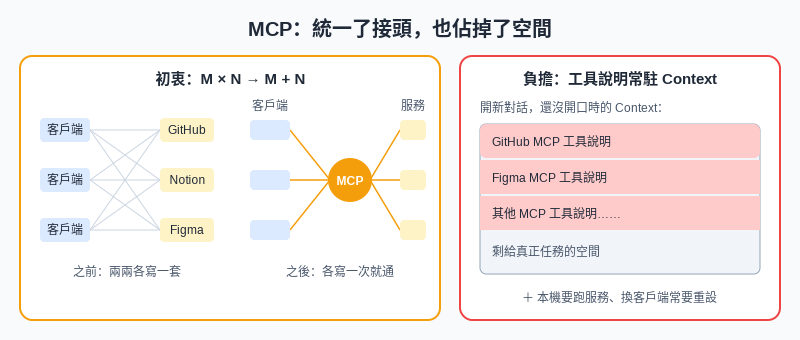
The problem is Context: every tool needs a name, a description, and a parameter schema, and in early clients, once installed they were always resident, eating space before you’d said a word. Newer clients have started loading them on demand: only tool names stay in Context, and the full descriptions load when a tool is needed. Early client support was also uneven, so an MCP that worked in one client might need reconfiguring in another.
My view is that MCP isn’t going away. When you need to reach a remote service, manage permissions centrally, or the client has no terminal at all, MCP is still the right fit. What it’s losing ground on is mainly the cases where a good CLI already exists on the machine.
Slimming down: CLIs, Skills, and on-demand file search
From 2025 on, nearly every mainstream agent ships with three built-in abilities: reading and writing files, searching files, and running terminal commands.
CLIs
Language models work with text to begin with, and a CLI’s input and output are just text — no need to make sense of a screen first, as with a graphical interface. And it costs no Context when idle: models already know tools like git and gh, and for anything unfamiliar there’s --help. As long as the agent can open a terminal, switching clients needs no reconfiguration.
Skills
A CLI only tells the AI how to type commands, not how your work is done. Skills fill that gap: a folder with a SKILL.md and helper scripts.
This blog is an example. I wrote “turn a note into a bilingual post” as a Skill. It records the frontmatter format, what information must be masked, and how to check the build — it even requires handing the draft to a separate agent for an independent review. Normally it takes up just one line (name and summary) in the Context; the full text loads only when I say “turn this into a post.”
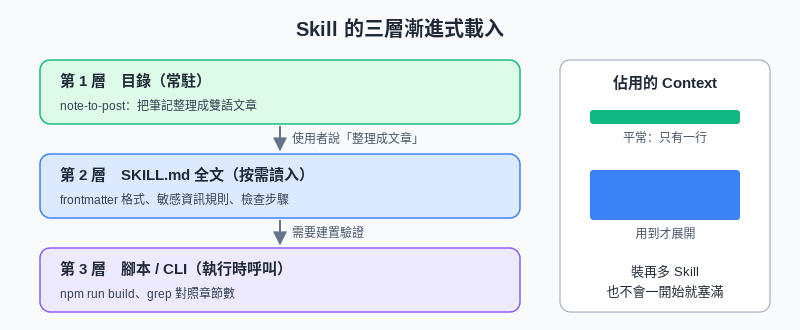
The biggest difference from early workflows: a workflow has its steps hard-coded by an external program, while with a Skill the agent plans after reading the instructions, and fixes things itself when the build fails.
From RAG to on-demand file search
Early RAG (retrieval-augmented generation) split code into chunks, stored them as vectors in a database, and retrieved snippets by semantic similarity. Applied to code, it has two problems: the index goes stale as soon as the code changes, and chunking breaks the call relationships across files.
Today’s agents skip the index altogether: when they need something, they grep for keywords and glob to filter filenames, then open the file and edit it — always reading the latest version.
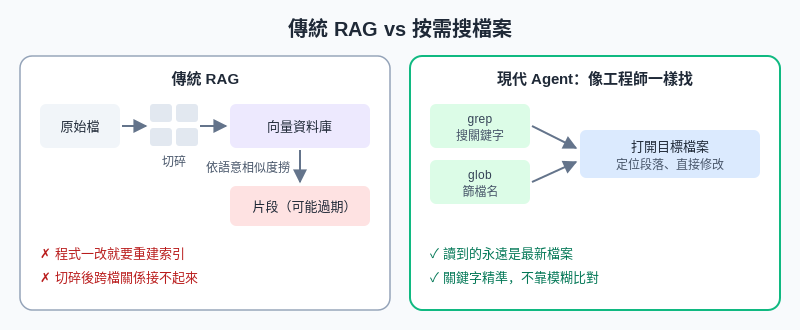
Still, I don’t think RAG is obsolete. Code has precise keywords (function names, error messages) that exact search handles well. But piles of PDFs, meeting notes, and support Q&A describe the same thing in many different ways, and there semantic retrieval still beats grep. For the basics of how RAG works, see my earlier post, “RAG basics: letting an LLM look things up before it answers.”
Key takeaways
- Models have no memory; Context is everything sent on each call, and leaner is better.
- Tool calling means “the model returns JSON, the local client executes it” — the client defines what an agent can do.
- ReAct lets an agent recover from its own failures; reasoning models make it think before it acts.
- MCP standardized how tools plug in, but in early clients its resident tool descriptions ate Context (newer clients have started loading them on demand); it still suits remote services and permission management.
- CLIs cost nothing when idle, and Skills add your workflow and load on demand.
- Code search moved to
grep/glob; large unstructured document sets are still a good fit for RAG.
References
- Oil, “From Prompt to Harness: A History of AI Agents” (title translated; Oil Book, in Simplified Chinese), 2026-11-06
- OpenAI, “Function calling and other API updates,” 2023
- Kojima et al., “Large Language Models are Zero-Shot Reasoners,” 2022
- Liu et al., “Lost in the Middle: How Language Models Use Long Contexts,” 2023
- Yao et al., “ReAct: Synergizing Reasoning and Acting in Language Models,” 2022
- Jimenez et al., “SWE-bench: Can Language Models Resolve Real-World GitHub Issues?,” 2023
- OpenAI, “Introducing SWE-bench Verified,” 2024
- Anthropic, “Introducing the Model Context Protocol,” 2024
- Anthropic, “Introducing Claude Opus 4.5,” 2025
Comments