Prompt engineering
Why phrasing changes an LLM's answer: system vs. user prompts, OpenAI and Anthropic guidance, four core techniques, and ten frameworks such as CO-STAR.
- First written
- Category
- AI
- Reading time
- 13 min
- Reads
- —
In this entry
Ask the same model the same question in a different way and you can get a very different answer. There’s no shortage of prompting tutorials online, and the framework acronyms keep getting longer, which can leave you unsure where to start. This post pulls together several Chinese-language tutorials, the official guides from OpenAI and Anthropic, and the origin of the CO-STAR framework, going from concepts and principles to techniques and how to pick a framework.
What a prompt is
A prompt is the input you send to a large language model (LLM). It steers the model toward the text, code, or other format you want, and it’s the interface between people and the model.
A prompt usually does four things:
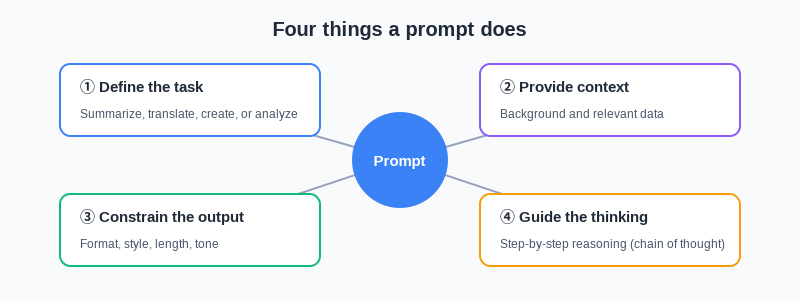
| Purpose | Details |
|---|---|
| Define the task | Summarize, translate, create, or analyze |
| Provide context | Background information and relevant data |
| Constrain the output | Format, style, length, tone |
| Guide the thinking | Ask for step-by-step reasoning (chain of thought) |
For the same request, vague and clear prompts look very different:
| Scenario | Vague | Clear |
|---|---|---|
| Article | Write me an article | In the style of a tech blog, write a 600-word article for general readers explaining AI tokens, with everyday analogies and concrete examples |
| Summary | Summarize these meeting notes | Turn these meeting notes into no more than 5 bullet points, then list the action items separately with an owner and a deadline for each |
| Translation | Translate this into English | Translate the product description below into American English. Keep the tone professional but natural, leave proper nouns as they are, and don’t add or remove content |
| Code | Write a sort | Write a Python function that sorts a product list (a list of dicts) by price from low to high, breaking ties by name, and include 3 test cases |
| Debugging | My code is broken, take a look | This Python code raises KeyError: 'id' when it runs; the full error message and code are below. Explain the cause and give me the corrected code |
| Write a leave request | Write an email to my manager requesting one day of annual leave on December 5 for family matters; my work has been handed over to a colleague. Formal tone, under 100 words | |
| Comparison | Which one is better? | I’m building an internal tool for a 5-person team. Compare PostgreSQL and MongoDB on learning curve, operations, and query flexibility in a table, and give one recommendation |
The clear versions spell out the task, audience, length, format, and constraints, so the model doesn’t have to guess. When debugging, pasting the full error message and code helps far more than saying “it’s broken.”
System prompts and user prompts
What the model receives on each call usually contains two kinds of prompts:
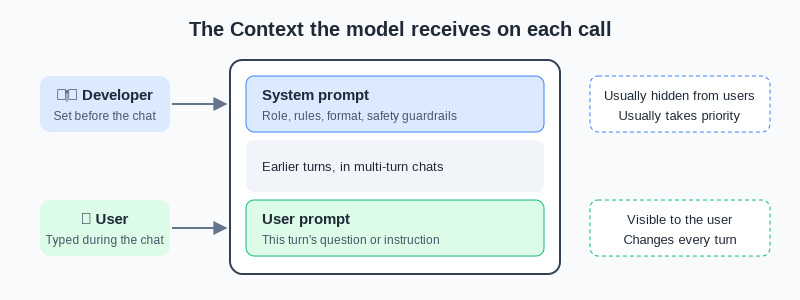
- User prompt: what the user types into the chat box, such as “Translate this into English” or “Summarize the key points of this meeting.” Users write it and can see it; it’s for asking questions, describing needs, or giving instructions. It changes with every turn and can be short or long. The clearer the description, the closer the result.
- System prompt: low-level instructions the developer sets before the conversation starts, defining the AI’s role, behavior, style, and limits — think of it as the AI’s “rules of the job.”
Common uses of a system prompt:
| Use | Example |
|---|---|
| Role | You are the customer-service bot for brand XX |
| Behavior rules | Do not discuss competitors’ products |
| Output format | Always answer in JSON |
| Knowledge injection | Include product docs and FAQs |
| Safety guardrails | Do not generate harmful content |
| Aspect | User prompt | System prompt |
|---|---|---|
| Who writes it | The user | The developer |
| Visible? | Yes | Usually hidden |
| When | Typed at any point in the conversation | Set before the conversation |
| Purpose | State a need | Define the role and rules |
| Analogy | A customer’s order | The restaurant’s service manual |
The system prompt usually takes priority over the user prompt: if a user asks for something that isn’t allowed, the system prompt can still block it. That’s why it’s commonly used to control safety, answer style, and product features.
Key points from the official guides
OpenAI and Anthropic both publish official prompting guides. Both cover the first four points; the last two each come from one of them:
- Be specific: Spell out the background, goal, length, format, and style instead of firing off a vague request.
- Separate instructions from data: OpenAI suggests putting instructions at the start and separating content with
###or"""; Anthropic suggests XML tags (such as<instructions>and<example>) to separate instructions, examples, and input data. - Say what to do, not just what not to do: Describing the behavior you want works better than listing prohibitions.
- Show the output format: When the model sees an example format, its answers are more consistent and easier to parse in code.
- Start simple (OpenAI): Try zero-shot first, add examples (few-shot) if that isn’t enough, and only consider fine-tuning if neither works.
- Long data first, task last (Anthropic): Anthropic’s official docs recommend putting background material first and the task you want done at the end of the prompt.
OpenAI also notes that reasoning models (models that think before answering) are prompted differently from regular models. Its reasoning-model guide recommends keeping instructions simple and direct — you don’t need to walk them through how to think.
Four common techniques
1. Role prompting
Assign a professional identity first so the model answers from that perspective; the tone and content become more consistent and professional.
You are a software architect with 20 years of experience. Please review the following code…2. Few-shot prompting
When a requirement is hard to describe in words, give a few “input → output” pairs. This works well for classification, format conversion, summarization, and data labeling.
Classify product reviews as positive, neutral, or negative:
<example>'This product is great' → positive</example>
<example>'It's acceptable' → neutral</example>
<example>'The quality is poor' → negative</example>
Now classify: 'It broke in less than a week'
The examples should cover every possible category. If they only show “positive” and “negative,” a neutral review like “It’s acceptable” forces the model to pick a side.
3. Chain of thought
Ask the model to break the problem down and reason step by step before answering. This suits math, logical reasoning, debugging, and complex decisions.
Think step by step: analyze the problem first, then give your answer.4. Add constraints
Spell out the language, length, format, style, and output structure, and the answer is less likely to wander.
Answer in English, in under 300 words, as bullet points.Structured frameworks
A framework’s job is to make sure you don’t leave anything out. An LLM is essentially predicting the next word; the clearer the constraints, the narrower the range of possible answers, the more stable the result, and the less back-and-forth you need.
Plenty of frameworks circulate online, and most are mnemonics compiled by the community with no formal origin. The one with the clearest source is CO-STAR: it was developed by the Data Science and AI Division of Singapore’s Government Technology Agency (GovTech) and included in its 2023 Prompt Engineering Playbook. Sheila Teo used it to win Singapore’s first GPT-4 prompt engineering competition and later wrote about it, which made it widely known.
Ten common frameworks
| Framework | Elements | Best for |
|---|---|---|
| RTF | Role, Task, Format | Quick Q&A, simple generation |
| TAG | Task, Action, Goal | Tasks carried out in steps |
| APE | Action, Purpose, Expectation | Tasks where you need to explain “why” |
| ICIO | Instruction, Context, Input, Output | Data processing, format conversion |
| RACE | Role, Action, Context, Expectation | General writing, emails |
| CARE | Context, Action, Result, Example | Teaching, training, documentation |
| RISE | Role, Input, Steps, Expectation | Analysis reports, strategy |
| CRISPE | Capacity and Role, Insight, Statement, Personality, Experiment | In-depth analysis, creative ideation |
| BROKE | Background, Role, Objective, Key Results, Evolve | Project-level tasks, business analysis |
| CO-STAR | Context, Objective, Style, Tone, Audience, Response | Brand copy, press releases |
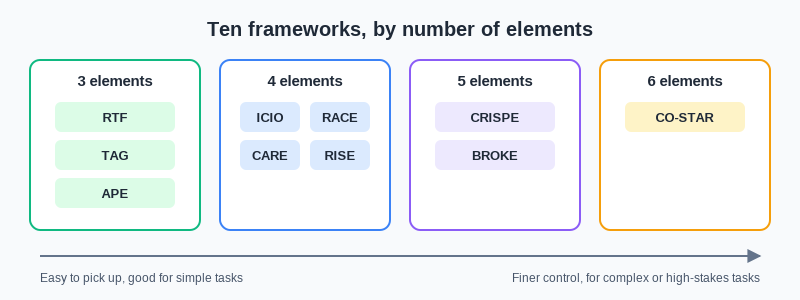
Fewer elements are easier to pick up; more elements give finer control but feel bloated for simple tasks.
How to choose
- Look at the task type
- Execution (clear input and output formats, such as data conversion or writing code): ICIO, RTF
- Creative (style, tone, and audience matter): CO-STAR, CARE
- Analytical (multi-step reasoning, strategic advice): RISE, BROKE, CRISPE
- Look at the cost of getting it wrong
- Easy to redo: RTF, TAG, APE
- Needs reasonable accuracy: ICIO, RACE, CARE
- Serious consequences: BROKE, CRISPE, CO-STAR, combined if needed
- Combine them: For a business plan, use BROKE to set the overall direction and CO-STAR to fill in style and audience; for a competitive analysis, use RISE to control the steps and ICIO to specify the output format.
An example for each framework
Here’s one example per framework. RTF and CO-STAR use the same task (a social media promo post for a neighborhood coffee shop) so they can be compared at the end.
RTF: role, task, format — three lines and you’re done.
# Role
You are a social media editor.
# Task
Write a promo post for a coffee shop.
# Format
Use emoji to separate sections.TAG: state the task, then the concrete actions, then the goal.
# Task
Summarize this annual report.
# Action
Pull out key figures such as revenue, costs, and growth rate, with one sentence on each.
# Goal
Under 300 words, so a manager can get the gist in 30 seconds.APE: adds a purpose, so the model knows why it’s doing the task.
# Action
Write three social media ads for a newly launched insulated bottle.
# Purpose
Build brand awareness and drive sales in the online store.
# Expectation
Under 50 words each, each highlighting one selling point and ending with a call to action.ICIO: separates the data to process as its own “input,” which suits format conversion.
# Instruction
Turn the customer feedback below into a repair ticket.
# Context
We're an appliance repair company, and tickets are imported into our ticketing system; ticket_id is generated by the system, so set it to null.
# Input
"The air conditioner starts dripping water ten minutes after I turn it on. Model AC-200."
# Output
JSON with the fields ticket_id, device_type, and issue, using snake_case field names.RACE: a role plus background, good for general writing and emails.
# Role
You are an HR manager.
# Action
Write an email turning down a job applicant.
# Context
They reached the final interview round, but we chose a candidate whose experience was a closer fit.
# Expectation
Professional and empathetic, under 200 words, inviting them to apply again in the future.CARE: ends by specifying the example to use, which suits teaching.
# Context
A new marketing hire isn't familiar with growth funnels.
# Action
Explain the five stages of the AARRR model in plain language.
# Result
Afterward, they can name one metric to track at each stage.
# Example
Use "a campus club recruiting new members" as the example for every stage.RISE: spells out the steps, which suits analysis reports.
# Role
You are a strategy analyst.
# Input
Attached are the price lists and feature lists of three competitors.
# Steps
1. Organize each competitor's pricing and features
2. Compare the differences
3. Identify our opportunities
4. Make recommendations
# Expectation
A Markdown comparison table plus 5 key insights.CRISPE: besides role and background, it specifies a personality, and the last step asks for several versions to compare.
# Capacity and Role
You are a brand strategy consultant.
# Insight
We're a new AI writing tool, and our main customers are freelancers.
# Statement
Analyze our market positioning and propose a brand tagline.
# Personality
Direct and practical; avoid marketing jargon.
# Experiment
Give me 3 tagline versions in different styles to compare.BROKE: uses key results to define what “done” means, and leaves room to iterate.
# Background
Our e-commerce site's Q3 revenue was 15% lower than the previous quarter.
# Role
You are a business data analyst.
# Objective
Find the main causes of the revenue drop.
# Key Results
1. Identify the 3 steps with the worst drop-off
2. Propose 3 improvement strategies
# Evolve
Start with a preliminary analysis; I'll add more data and you'll refine the conclusions.CO-STAR: spells out style, tone, and audience separately, which suits public-facing copy.
# Context
A neighborhood coffee shop known for specialty pour-over beans; it's also pet-friendly.
# Objective
Bring in office workers and freelancers within 3 km.
# Style
Like a genuine visit write-up, not an ad.
# Tone
Friendly and warm.
# Audience
Urban professionals aged 25–35 who care about quality of life.
# Response
A title, the body, and 5 hashtags.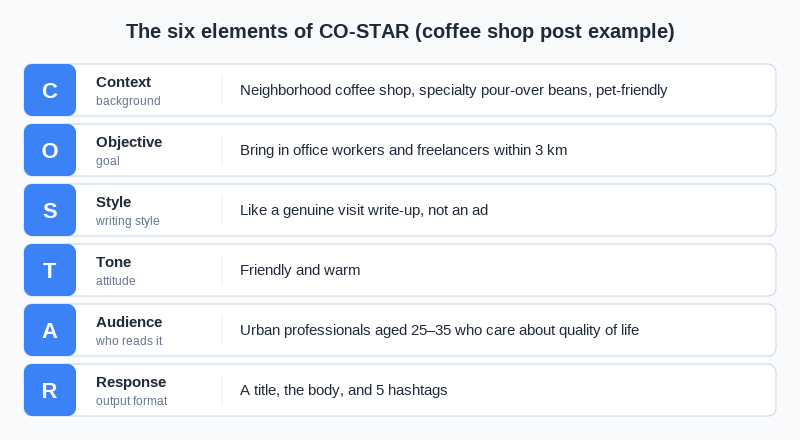
For the same coffee shop post, the RTF version produces a post, but the style and audience are left to the model’s guesswork; the CO-STAR version spells out the audience, tone, and elements to include. Every example uses # headings to separate its elements, echoing the earlier principle of separating instructions from data.
Learning path
- Start with RTF alone to build the habit of “set the role, give the task, then specify the format.”
- Once that’s comfortable, add context and output constraints with RACE or ICIO.
- When you need fine control, move on to CO-STAR or CRISPE.
Frameworks are just aids; with practice the elements become second nature and you won’t need a template every time.
Key takeaways
- A prompt is the input sent to an LLM, and how you write it directly affects output quality.
- The system prompt holds the developer’s preset rules and the user prompt holds the user’s current request; the former usually takes priority.
- Key points from the official guides: be specific, separate instructions from data, phrase things positively, and show the output format — plus OpenAI’s start simple and Anthropic’s long data first.
- Four common techniques: role prompting, few-shot examples, step-by-step reasoning, and constraints.
- Frameworks keep you from missing elements: RTF for simple tasks, CO-STAR when style and audience matter, RISE or BROKE for complex analysis.
References
- codingPower, “Introduction to prompts: core concepts, mainstream frameworks, and certifications” (title translated; in Chinese), CSDN (CC BY-SA 4.0). The four purposes of a prompt in “What a prompt is,” and the “Structured frameworks” section, are adapted from this article, and those sections are likewise licensed under CC BY-SA 4.0.
- TommyHuang, “Part 3: The language for talking to models — Prompt, User Prompt, System Prompt” (title translated; in Chinese), HackMD. The “Article” row of the vague-vs-clear table, the “System prompts and user prompts” section, and some of the technique examples in this post are based on this article.
- OpenAI, “Reasoning best practices”
- OpenAI, “Best practices for prompt engineering with the OpenAI API”
- Anthropic, “Prompt engineering overview”
- Anthropic, “Prompting best practices”
- GovTech Singapore, “Mastering the art of prompt engineering with Empower”
- GovTech Singapore, “Prompt Engineering Playbook (Beta v3)”
- Sheila Teo, “How I Won Singapore’s GPT-4 Prompt Engineering Competition”
Comments